Latest Posts
Thursday, February 12, 2015
This is part three of our series on Entity Framework. In the last blog we went over how to create an Entity Framework model with the Northwind database. Now we are going to use that model in our ASP.NET by binding the Entity objects that have created to a GridView in our "Northwind" ASP.NET project. Usually we would put the Entity Framework model in a class library project and use it as our data access layer, but for simplicity I've decided to put in the same project as the ASP.NET pages.
Below are the directions on how to use the Entity objects in our web pages.
1. Create "Default.aspx" page in the "Northwind" web project.
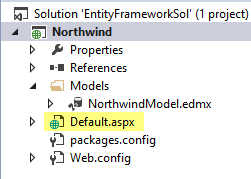
Below are the directions on how to use the Entity objects in our web pages.
1. Create "Default.aspx" page in the "Northwind" web project.
To create the delete procedure type in the following code in the SQL editor window in "Microsoft SQL Server Management Studio"
The stored procedure only takes in one input parameter which is the ProductID, the DELETE statement needs a ProductID because if there is no WHERE clause, every record in the product in the Products table will be deleted. Make sure you backup the table before you work with a DELETE stored procedure.
Here is how would execute the stored procedure
Blogs In the T-SQL Series:
USE Northwind
GO
CREATE PROCEDURE dbo.delProduct @ProductID int
AS
DELETE FROM Products
WHERE Products.ProductID = @ProductID
GO
The stored procedure only takes in one input parameter which is the ProductID, the DELETE statement needs a ProductID because if there is no WHERE clause, every record in the product in the Products table will be deleted. Make sure you backup the table before you work with a DELETE stored procedure.
Here is how would execute the stored procedure
EXEC dbo.delProduct 78
Blogs In the T-SQL Series:
- T-SQL: Stored Procedure (INSERT), INSERT A New Product In Northwind Part 1
- ASP.NET : Stored Procedures (INSERT), Insert a new Northwind Product Part 2
- T-SQL: Stored Procedures (DELETE), DELETE An Existing Northwind Product Part 3
- T-SQL: Stored Procedures (UPDATE), UPDATE An Existing Product In Northwind Part 4
- T-SQL: Stored Procedures (SELECT), SELECT Products and The Supplier Part 5
- ASP.NET: Calling Stored Procedure With A Parameter With SqlParameter Part 6
- ASP.NET: Get a Single Value From a Stored Procedure Part 7
- SQL Server: Granting Access Permissions to Stored Procedures For IIS Part 8
Wednesday, February 11, 2015
This is part two of our series on Entity Framework, if you would like to catch up with what we did on on part one, feel free to go over the lesson so that you can follow along.
In the last part we installed Entity Framework 6.1.1 with NuGet package management tool in Visual Studio. In this lesson we will learn to create an Entity Model using the Northwind database. Follow the steps below.
In the last part we installed Entity Framework 6.1.1 with NuGet package management tool in Visual Studio. In this lesson we will learn to create an Entity Model using the Northwind database. Follow the steps below.
- Add a new folder call "Models" in the "Northwind" database

Today we will be calling a stored procedure in SQL Server that we've created earlier in this blog call addProduct. The stored procedure takes the following input parameters.

1. First you need the namespaces
2. Then get the Northwind connection string value from the Web.config file
3. Now call the stored procedure and output the result from the SqlDataReader
Blogs In the T-SQL Series:
1. First you need the namespaces
using System.Web.Configuration;
using System.Data.SqlClient;
using System.Data;
2. Then get the Northwind connection string value from the Web.config file
string connectString = WebConfigurationManager.ConnectionStrings["NorthwindConnectionString"].
ConnectionString;
3. Now call the stored procedure and output the result from the SqlDataReader
  using (SqlConnection conn = new SqlConnection(connectString))
  {
            conn.Open();
            SqlCommand cmd = new SqlCommand();
            cmd.CommandText = "addProduct";
            cmd.CommandType = CommandType.StoredProcedure;
            cmd.Connection = conn;

            SqlParameter productName = new SqlParameter("@ProductName", "Teh");
            productName.SqlDbType = SqlDbType.NVarChar;
            productName.Direction = ParameterDirection.Input;
            cmd.Parameters.Add(productName);

            SqlParameter supplerID = new SqlParameter("@SupplierID", 1);
            supplerID.SqlDbType = SqlDbType.Int;
            supplerID.Direction = ParameterDirection.Input;
            cmd.Parameters.Add(supplerID);

            SqlParameter categoryID = new SqlParameter("@CategoryID", 1);
            categoryID.SqlDbType = SqlDbType.Int;
            categoryID.Direction = ParameterDirection.Input;
            cmd.Parameters.Add(categoryID);

            SqlParameter quantityPerUnit = new SqlParameter("@QuantityPerUnit", "20 boxes of 12 oz.");
            quantityPerUnit.SqlDbType = SqlDbType.NVarChar;
            quantityPerUnit.Direction = ParameterDirection.Input;
            cmd.Parameters.Add(quantityPerUnit);

            SqlParameter unitPrice = new SqlParameter("@UnitPrice", 12.99);
            unitPrice.SqlDbType = SqlDbType.Money;
            unitPrice.Direction = ParameterDirection.Input;
            cmd.Parameters.Add(unitPrice);

            SqlParameter unitsInStock = new SqlParameter("@UnitsInStock", 6);
            unitsInStock.SqlDbType = SqlDbType.SmallInt;
            unitsInStock.Direction = ParameterDirection.Input;
            cmd.Parameters.Add(unitsInStock);

            SqlParameter reorderLevel = new SqlParameter("@ReorderLevel", 2);
            reorderLevel.SqlDbType = SqlDbType.SmallInt;
            reorderLevel.Direction = ParameterDirection.Input;
            cmd.Parameters.Add(reorderLevel);

            SqlParameter discontinued = new SqlParameter("@Discontinued", false);
            discontinued.SqlDbType = SqlDbType.Bit;
            discontinued.Direction = ParameterDirection.Input;
            cmd.Parameters.Add(discontinued);

            int rowsAffected = cmd.ExecuteNonQuery();

            Response.Write(rowsAffected);
    }
In the above code you add the parameters required by the addProduct stored procedure. You specify the name, type, and value. Then add it to command object's parameters list. Then you execute the ExecuteNonQuery() method because you are not get a resultset back or a scalar value. The ExecuteNonQuery() method returns an int value, usually the rows that were affected value.
Blogs In the T-SQL Series:
- T-SQL: Stored Procedure (INSERT), INSERT A New Product In Northwind Part 1
- ASP.NET : Stored Procedures (INSERT), Insert a new Northwind Product Part 2
- T-SQL: Stored Procedures (DELETE), DELETE An Existing Northwind Product Part 3
- T-SQL: Stored Procedures (UPDATE), UPDATE An Existing Product In Northwind Part 4
- T-SQL: Stored Procedures (SELECT), SELECT Products and The Supplier Part 5
- ASP.NET: Calling Stored Procedure With A Parameter With SqlParameter Part 6
- ASP.NET: Get a Single Value From a Stored Procedure Part 7
- SQL Server: Granting Access Permissions to Stored Procedures For IIS Part 8
Tuesday, February 10, 2015
Here is how you would create a stored procedure to insert a new record into the Products table in the Northwind database.
When you see a parameter with the = null, it means the field can have a null value. Since the ProductID is auto incremented you don't include it. The data types must match the fields in the database.
Here is how you would execute the stored procedure
When you see a parameter with = DEFAULT it means to assign the DEFAULT value to the field, if the execution is completed successfully you should see the message.
(1 row(s) affected)
Blogs In the T-SQL Series:
USE Northwind
GO
CREATE PROCEDURE dbo.addProduct(
 @ProductName nvarchar(40),
 @SupplierID int = null,  --default is null
 @CategoryID int = null,
 @QuantityPerUnit nvarchar(20) = null,
 @UnitPrice money = null,
 @UnitsInStock smallint = null,
 @UnitsOnOrder smallint = null,
 @ReorderLevel smallint = null,
 @Discontinued bit)
AS
INSERT INTO Products(ProductName,
 SupplierID,
 CategoryID,
 QuantityPerUnit,
 UnitPrice,
 UnitsInStock,
 UnitsOnOrder,
 ReorderLevel,
 Discontinued)
VALUES(@ProductName,
 @SupplierID,
 @CategoryID,
 @QuantityPerUnit,
 @UnitPrice,
 @UnitsInStock,
 @UnitsOnOrder,
 @ReorderLevel,
 @Discontinued)
GO
When you see a parameter with the = null, it means the field can have a null value. Since the ProductID is auto incremented you don't include it. The data types must match the fields in the database.
Here is how you would execute the stored procedure
EXEC dbo.addProduct @ProductName ='Teh',
 @SupplierID = DEFAULT,
 @CategoryID = DEFAULT,
 @QuantityPerUnit ='20 boxes x 12 oz.',
 @UnitPrice = 12.99,
 @UnitsInStock = 5,
 @UnitsOnOrder = 6,
 @ReorderLevel = DEFAULT,
 @Discontinued = 0
When you see a parameter with = DEFAULT it means to assign the DEFAULT value to the field, if the execution is completed successfully you should see the message.
(1 row(s) affected)
Blogs In the T-SQL Series:
- T-SQL: Stored Procedure (INSERT), INSERT A New Product In Northwind Part 1
- ASP.NET : Stored Procedures (INSERT), Insert a new Northwind Product Part 2
- T-SQL: Stored Procedures (DELETE), DELETE An Existing Northwind Product Part 3
- T-SQL: Stored Procedures (UPDATE), UPDATE An Existing Product In Northwind Part 4
- T-SQL: Stored Procedures (SELECT), SELECT Products and The Supplier Part 5
- ASP.NET: Calling Stored Procedure With A Parameter With SqlParameter Part 6
- ASP.NET: Get a Single Value From a Stored Procedure Part 7
- SQL Server: Granting Access Permissions to Stored Procedures For IIS Part 8
Saturday, February 7, 2015
As a developer we always forget how to query for records with NULL values, no matter how many times we do it. It's just weird. Our first instinct is to write the query as such
But that will not return any results. The funny thing is there's no SQL error so you think that there's no results. However if you change the query to this
You see there's plenty of records with Region IS NULL
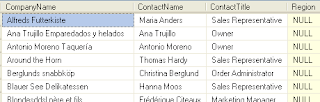
The reverse is true if you want records that are not NULL you would not write the query like this
But you want to write the query like this instead
   SELECT CompanyName, ContactName, ContactTitle,Region
   FROM Customers
   WHERE Region = NULL
But that will not return any results. The funny thing is there's no SQL error so you think that there's no results. However if you change the query to this
   SELECT CompanyName, ContactName, ContactTitle,Region
   FROM Customers
   WHERE Region IS NULL
You see there's plenty of records with Region IS NULL

The reverse is true if you want records that are not NULL you would not write the query like this
   SELECT CompanyName, ContactName, ContactTitle,Region
   FROM Customers
   WHERE Region != NULL
But you want to write the query like this instead
   SELECT CompanyName, ContactName, ContactTitle,Region
   FROM Customers
   WHERE Region IS NOT NULL
Wednesday, October 8, 2014
The <mark> element is used to highlight a text by assigning a background-color attribute
Example:
This is an example of the mark element
Previous: HTML5 : Progress Element
Next: HTML5 Tags
Example:
This is an example of the <mark style="background-color:yellow;">mark</mark> element
This is an example of the mark element
Previous: HTML5 : Progress Element
Next: HTML5 Tags
Tuesday, October 7, 2014
<progress> element represents the progress of a task or goals and objectives, there are two ways that you can set this element, they are the following
- Determinate - know in advance the starting and ending values
- Indeterminate - end value is unknown in advance (remove value attribute)
Determinate Example:
Our goal is to have 500 runners:
0 500
<p>Our goal is to have 500 runners: </p>
0
<progress value=”250” max=”500”></progress>
500
Our goal is to have 500 runners:
0 500
Tuesday, August 12, 2014
In this blog I will show how to install Entity Framework 6.1.1 with NuGet in Visual Studio 2013
1. Create a project call "Northwind"
1. Create a project call "Northwind"
Saturday, August 9, 2014
I am starting a new series in this blog that creates a real world example. Most web application requires the same things over and over again, and in every organization I worked in there is an intranet application either home grown, or some flavor of a COTS product. So you can't get anymore real world than that. I will use the rapid development method, so some background information will not be discussed. Feel free to do research at the concepts that you don't understand.
Subscribe to:
Posts (Atom)


