Latest Posts
Tuesday, February 10, 2015
Here is how you would create a stored procedure to insert a new record into the Products table in the Northwind database.
When you see a parameter with the = null, it means the field can have a null value. Since the ProductID is auto incremented you don't include it. The data types must match the fields in the database.
Here is how you would execute the stored procedure
When you see a parameter with = DEFAULT it means to assign the DEFAULT value to the field, if the execution is completed successfully you should see the message.
(1 row(s) affected)
Blogs In the T-SQL Series:
USE Northwind
GO
CREATE PROCEDURE dbo.addProduct(
 @ProductName nvarchar(40),
 @SupplierID int = null,  --default is null
 @CategoryID int = null,
 @QuantityPerUnit nvarchar(20) = null,
 @UnitPrice money = null,
 @UnitsInStock smallint = null,
 @UnitsOnOrder smallint = null,
 @ReorderLevel smallint = null,
 @Discontinued bit)
AS
INSERT INTO Products(ProductName,
 SupplierID,
 CategoryID,
 QuantityPerUnit,
 UnitPrice,
 UnitsInStock,
 UnitsOnOrder,
 ReorderLevel,
 Discontinued)
VALUES(@ProductName,
 @SupplierID,
 @CategoryID,
 @QuantityPerUnit,
 @UnitPrice,
 @UnitsInStock,
 @UnitsOnOrder,
 @ReorderLevel,
 @Discontinued)
GO
When you see a parameter with the = null, it means the field can have a null value. Since the ProductID is auto incremented you don't include it. The data types must match the fields in the database.
Here is how you would execute the stored procedure
EXEC dbo.addProduct @ProductName ='Teh',
 @SupplierID = DEFAULT,
 @CategoryID = DEFAULT,
 @QuantityPerUnit ='20 boxes x 12 oz.',
 @UnitPrice = 12.99,
 @UnitsInStock = 5,
 @UnitsOnOrder = 6,
 @ReorderLevel = DEFAULT,
 @Discontinued = 0
When you see a parameter with = DEFAULT it means to assign the DEFAULT value to the field, if the execution is completed successfully you should see the message.
(1 row(s) affected)
Blogs In the T-SQL Series:
- T-SQL: Stored Procedure (INSERT), INSERT A New Product In Northwind Part 1
- ASP.NET : Stored Procedures (INSERT), Insert a new Northwind Product Part 2
- T-SQL: Stored Procedures (DELETE), DELETE An Existing Northwind Product Part 3
- T-SQL: Stored Procedures (UPDATE), UPDATE An Existing Product In Northwind Part 4
- T-SQL: Stored Procedures (SELECT), SELECT Products and The Supplier Part 5
- ASP.NET: Calling Stored Procedure With A Parameter With SqlParameter Part 6
- ASP.NET: Get a Single Value From a Stored Procedure Part 7
- SQL Server: Granting Access Permissions to Stored Procedures For IIS Part 8
Saturday, February 7, 2015
As a developer we always forget how to query for records with NULL values, no matter how many times we do it. It's just weird. Our first instinct is to write the query as such
But that will not return any results. The funny thing is there's no SQL error so you think that there's no results. However if you change the query to this
You see there's plenty of records with Region IS NULL
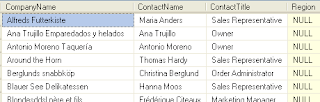
The reverse is true if you want records that are not NULL you would not write the query like this
But you want to write the query like this instead
   SELECT CompanyName, ContactName, ContactTitle,Region
   FROM Customers
   WHERE Region = NULL
But that will not return any results. The funny thing is there's no SQL error so you think that there's no results. However if you change the query to this
   SELECT CompanyName, ContactName, ContactTitle,Region
   FROM Customers
   WHERE Region IS NULL
You see there's plenty of records with Region IS NULL

The reverse is true if you want records that are not NULL you would not write the query like this
   SELECT CompanyName, ContactName, ContactTitle,Region
   FROM Customers
   WHERE Region != NULL
But you want to write the query like this instead
   SELECT CompanyName, ContactName, ContactTitle,Region
   FROM Customers
   WHERE Region IS NOT NULL
Wednesday, October 8, 2014
The <mark> element is used to highlight a text by assigning a background-color attribute
Example:
This is an example of the mark element
Previous: HTML5 : Progress Element
Next: HTML5 Tags
Example:
This is an example of the <mark style="background-color:yellow;">mark</mark> element
This is an example of the mark element
Previous: HTML5 : Progress Element
Next: HTML5 Tags
Tuesday, October 7, 2014
<progress> element represents the progress of a task or goals and objectives, there are two ways that you can set this element, they are the following
- Determinate - know in advance the starting and ending values
- Indeterminate - end value is unknown in advance (remove value attribute)
Determinate Example:
Our goal is to have 500 runners:
0 500
<p>Our goal is to have 500 runners: </p>
0
<progress value=”250” max=”500”></progress>
500
Our goal is to have 500 runners:
0 500
Tuesday, August 12, 2014
In this blog I will show how to install Entity Framework 6.1.1 with NuGet in Visual Studio 2013
1. Create a project call "Northwind"
1. Create a project call "Northwind"
Saturday, August 9, 2014
I am starting a new series in this blog that creates a real world example. Most web application requires the same things over and over again, and in every organization I worked in there is an intranet application either home grown, or some flavor of a COTS product. So you can't get anymore real world than that. I will use the rapid development method, so some background information will not be discussed. Feel free to do research at the concepts that you don't understand.
Tuesday, July 29, 2014
Instead of select the columns on your GridView using the GridView's "Edit Columns" wizard, you can use a custom SELECT statement that you write to display the appropriate columns. In this blog we will write our own custom SELECT statement to display the category name, and supplier company on our GridView control.
To specify a custom SELECT statement perform the following steps:
1. Click on the ">" icon on the SqlDataSource1 control, then click on the "Configure Data Source"
To specify a custom SELECT statement perform the following steps:
1. Click on the ">" icon on the SqlDataSource1 control, then click on the "Configure Data Source"
Friday, July 25, 2014
The DELETE statement conflicted with the REFERENCE constraint "FK_Order_Details_Products". The conflict occurred in database "Northwind", table "dbo.Order Details", column 'ProductID'.
The statement has been terminated.
Description: An unhandled exception occurred during the execution of the current web request. Please review the stack trace for more information about the error and where it originated in the code.
Exception Details: System.Data.SqlClient.SqlException: The DELETE statement conflicted with the REFERENCE constraint "FK_Order_Details_Products". The conflict occurred in database "Northwind", table "dbo.Order Details", column 'ProductID'.
The statement has been terminated.
Source Error:
An unhandled exception was generated during the execution of the current web request. Information regarding the origin and location of the exception can be identified using the exception stack trace below.
Stack Trace:
[SqlException (0x80131904): The DELETE statement conflicted with the REFERENCE constraint "FK_Order_Details_Products". The conflict occurred in database "Northwind", table "dbo.Order Details", column 'ProductID'.
The statement has been terminated.]
System.Data.SqlClient.SqlConnection.OnError(SqlException exception, Boolean breakConnection, Action`1 wrapCloseInAction) +1789294
System.Data.SqlClient.SqlInternalConnection.OnError(SqlException exception, Boolean breakConnection, Action`1 wrapCloseInAction) +5340642
System.Data.SqlClient.TdsParser.ThrowExceptionAndWarning(TdsParserStateObject stateObj, Boolean callerHasConnectionLock, Boolean asyncClose) +244
System.Data.SqlClient.TdsParser.TryRun(RunBehavior runBehavior, SqlCommand cmdHandler, SqlDataReader dataStream, BulkCopySimpleResultSet bulkCopyHandler, TdsParserStateObject stateObj, Boolean& dataReady) +1691
System.Data.SqlClient.SqlCommand.FinishExecuteReader(SqlDataReader ds, RunBehavior runBehavior, String resetOptionsString) +275
System.Data.SqlClient.SqlCommand.RunExecuteReaderTds(CommandBehavior cmdBehavior, RunBehavior runBehavior, Boolean returnStream, Boolean async, Int32 timeout, Task& task, Boolean asyncWrite, SqlDataReader ds) +1421
System.Data.SqlClient.SqlCommand.RunExecuteReader(CommandBehavior cmdBehavior, RunBehavior runBehavior, Boolean returnStream, String method, TaskCompletionSource`1 completion, Int32 timeout, Task& task, Boolean asyncWrite) +177
System.Data.SqlClient.SqlCommand.InternalExecuteNonQuery(TaskCompletionSource`1 completion, String methodName, Boolean sendToPipe, Int32 timeout, Boolean asyncWrite) +208
System.Data.SqlClient.SqlCommand.ExecuteNonQuery() +163
System.Web.UI.WebControls.SqlDataSourceView.ExecuteDbCommand(DbCommand command, DataSourceOperation operation) +378
System.Web.UI.WebControls.SqlDataSourceView.ExecuteDelete(IDictionary keys, IDictionary oldValues) +568
System.Web.UI.DataSourceView.Delete(IDictionary keys, IDictionary oldValues, DataSourceViewOperationCallback callback) +84
System.Web.UI.WebControls.GridView.HandleDelete(GridViewRow row, Int32 rowIndex) +930
System.Web.UI.WebControls.GridView.HandleEvent(EventArgs e, Boolean causesValidation, String validationGroup) +974
System.Web.UI.WebControls.GridView.RaisePostBackEvent(String eventArgument) +201
System.Web.UI.WebControls.GridView.System.Web.UI.IPostBackEventHandler.RaisePostBackEvent(String eventArgument) +13
System.Web.UI.Page.RaisePostBackEvent(IPostBackEventHandler sourceControl, String eventArgument) +13
System.Web.UI.Page.RaisePostBackEvent(NameValueCollection postData) +9703566
System.Web.UI.Page.ProcessRequestMain(Boolean includeStagesBeforeAsyncPoint, Boolean includeStagesAfterAsyncPoint) +1724
Version Information: Microsoft .NET Framework Version:4.0.30319; ASP.NET Version:4.0.30319.34009
Thursday, July 24, 2014
You will notice that when you first create the GridView control all the records are displayed in one page. You have to scroll just to see all the records. This can be overwhelming for your users if there are a lot of records. Also you can not sort or select each record on the GridVidew.
You will notice that when you first create the GridView control all the records are displayed in one page. You have to scroll just to see all the records. This can be overwhelming for your users if there are a lot of records. Also you can not sort or select each record on the GridVidew.
Subscribe to:
Posts (Atom)


